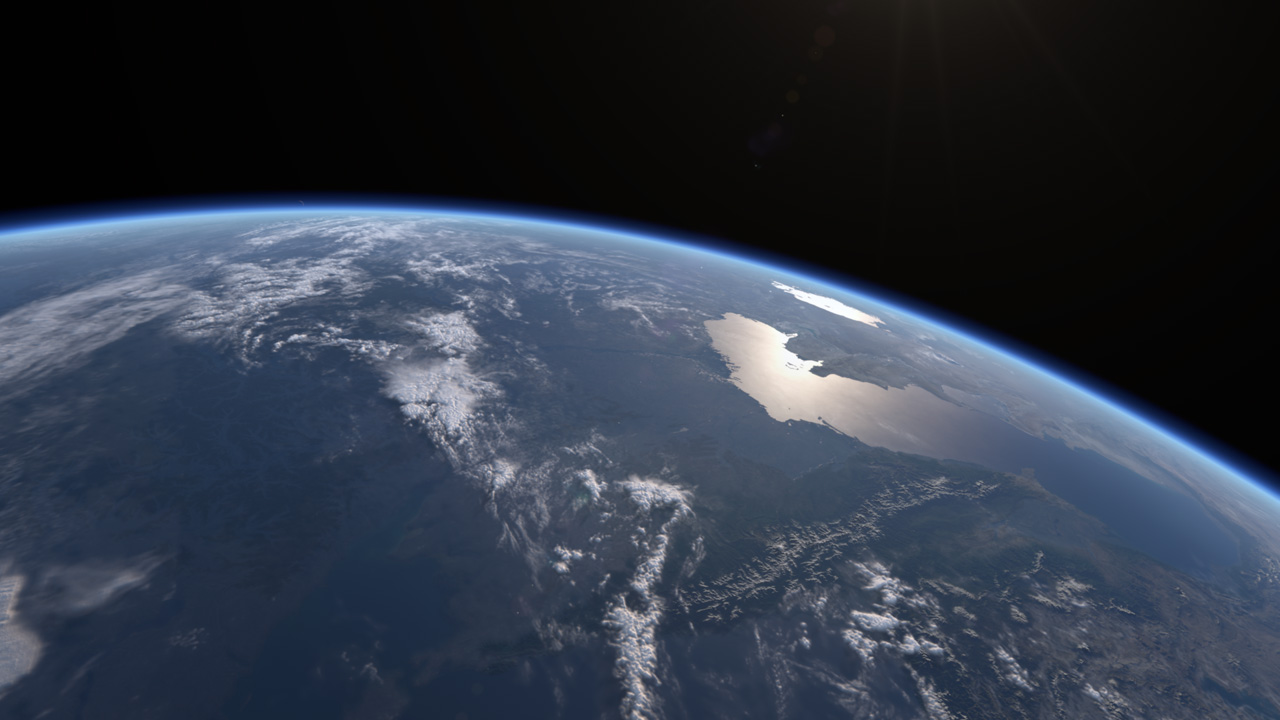
Enjoy a few more rendered images before the next installment of "making-of" ^^;
A journey to create a CG model of our beautiful
home planet
while learning more about
its wonders along the way...
Topics
- atmosphere (5)
- clouds (3)
- making-of (8)
- moon (1)
- night (5)
- ocean (3)
- research (16)
- scattering (4)
- shaders (5)
- specular (3)
- terminator (3)
- WIPshots (21)
Monday, July 2, 2012
Thursday, June 21, 2012
Making of a Planet - Part 2
In this post, I'll be describing in more detail how the CG Earth is constructed.
The whole planet was broken down into several key components: land, water, clouds, atmosphere and an atmospheric "rim". The atmosphere has two components because it's not a true volumetric simulation, but a kind of hack ^^;
A displacement shader is used with elevation data to create the mountains and terrain above ground, and bathymetry data is used to create the ocean floor below sea level.
The volumetric effect is created using a set of concentric sphere of increasing size and decreasing opacity. The Rayleigh scattering effects is creating using ramp lookup based on a modified Lambert angle. As the shading approaches the terminator, the light color turns reddish.
The other component is the atmospheric rim, which uses another ramp lookup to create the blue "outline" around the limb of the Earth.
I must confess the most of the effects are hacked - they are "physically informed", but not physically based. At this point in time I'm still researching true volumetric solutions for the clouds and true scattering for the atmosphere.
In the next post, I'll talk about the various shaders.
The whole planet was broken down into several key components: land, water, clouds, atmosphere and an atmospheric "rim". The atmosphere has two components because it's not a true volumetric simulation, but a kind of hack ^^;
Land
Nothing fancy here that's not been done for decades. A simple sphere primitive with polar (spherical) UV projection so that the Blue Marble textures can be wrapped around it. Of course, it's well known that the Earth is not a perfect sphere, but an oblate spheroid. This is approximated using an Equatorial radius of 6378.14km and Polar radius of 6356.75km![]() |
| An early "making-of" montage showing the key components of the Earth setup |
A displacement shader is used with elevation data to create the mountains and terrain above ground, and bathymetry data is used to create the ocean floor below sea level.
Water
This is just another sphere primitive with an ocean shader applied. Water reflects the sun with a much stronger specular glint than the land or clouds. In the final version, however, I ditched both the bathymetry and water components and instead included the ocean shader into the single land shader for the entire planet. This was done to optimize rendering since the sea is really not that transparent from space, therefore calculating displacement for the sea floor is a waste of render time.Clouds
After much experimentation with various volumetric hacks, I eventually settled upon the same age old technique everyone else is using - a sphere (surprise, surprise) mapped with transparency data from NASA's cloud texture, with the same cloud map doubling as a displacement map to give the clouds actual thickness. On top of this, I added procedural noise for detail, since the cloud map is of noticeably lower resolution than the land texture. To be honest, I feel that I have failed in the implementation of this component most miserably, so future versions will likely be done differently.![]() |
| Displacement mapping to give the clouds thickness; procedural noise to add detail |
Atmosphere and Rim
Another key component that makes or breaks the look of a CG planet is the atmosphere. The atmosphere of the Earth interacts with sunlight to produce a multitude of lighting effects and localized color shifts. Indeed, it is reason why the sky is blue and why the Sun appears yellowish when viewed from the ground.![]() |
| No atmosphere |
![]() |
| With atmosphere |
The volumetric effect is created using a set of concentric sphere of increasing size and decreasing opacity. The Rayleigh scattering effects is creating using ramp lookup based on a modified Lambert angle. As the shading approaches the terminator, the light color turns reddish.
The other component is the atmospheric rim, which uses another ramp lookup to create the blue "outline" around the limb of the Earth.
I must confess the most of the effects are hacked - they are "physically informed", but not physically based. At this point in time I'm still researching true volumetric solutions for the clouds and true scattering for the atmosphere.
![]() |
| The sane Rayleigh ramp lookup is used to color the cloud layer. A crude but effective technique ^^;; |
Size Matters
As mentioned previously, all modeling was done to relative scale as much as possible in the spirit of "realism". Initially I used a unit of 1km but the comparatively small details of Earth and the astronomical scale of the solar orbit appear to cause precision problems when rendering shadows. No amount of tweaking the raytracing bias worked. In the end, through trial and error I found that using a base unit of 10km seem to minimize the glitches. So, for example, instead of 6378.14 for the Equatorial radius, I used 637.814In the next post, I'll talk about the various shaders.
Labels:
atmosphere,
clouds,
making-of,
ocean,
scattering,
specular,
terminator,
WIPshots
Saturday, June 16, 2012
Making of a Planet (version 0.2b) - Part 1
As promised, I shall attempt to summarize the techniques I used to create the CG Earth from the previous post. This version represents another milestone in my efforts to create a decent photorealistic Earth using computer graphics.
Before I begin, it seems more and more people are interested in Earth observation. One emerging hobby is for people to build and launch home-made high altitude balloons containing low-cost GPS systems and digital cameras up into the stratosphere to capture videos and photos of the Earth from "space". These balloon capture amazing imagery of the Earth from altitudes upwards of 30km, but is still well within the Kármán line (altitude of 100km) commonly considered the boundary between Earth's atmosphere and outer space. For comparison, the International Space Station (ISS) orbits between 278-460km above ground. Still, the balloon footage are a great source of additional reference material ^_^
Looking at the scene network above, you can see that I have not only created the Earth, but also the Moon, Sun and the ISS. I've been careful to scale all the objects as well as their orbits to relatively accurate proportions using data from the internet. In reality, all orbits should be elliptical, but circular orbits are easier to setup for now. However, I did apply correct inclination and axial tilt parameters for both the Earth and Moon.
The setup is basic CG101: just use null objects and correct parenting. So, the Earth rotates about it's axis, the ISS and Moon rotates around the Earth, and the Earth-Moon system rotates about the Sun. The animation controls are set up for properly relative orbital periods - i.e. Earth rotates on it's own axis once a day, ISS makes one revolution round the Earth in 90 minutes, Moon revolves round the Earth every 27.3 days, Earth goes round the Sun in 365.25 days. Of course, time can be allowed to speed up, slow down or stop in the CG world. Offset controls allow independent control over exactly where to position the objects in orbit to allow fine tuning for shot composition.
In the next post, I'll describe how the Earth is constructed. Until then... ^^/
Before I begin, it seems more and more people are interested in Earth observation. One emerging hobby is for people to build and launch home-made high altitude balloons containing low-cost GPS systems and digital cameras up into the stratosphere to capture videos and photos of the Earth from "space". These balloon capture amazing imagery of the Earth from altitudes upwards of 30km, but is still well within the Kármán line (altitude of 100km) commonly considered the boundary between Earth's atmosphere and outer space. For comparison, the International Space Station (ISS) orbits between 278-460km above ground. Still, the balloon footage are a great source of additional reference material ^_^
Scene Setup
Okay, back to the production report. In this first post I will outline the features I have built into my scene setup and the type of options they offer for creating Earth renders.![]() |
| Houdini scene |
![]() |
| The Moon looks tiny bacause it is 384400 km away from Earth. It takes light 1.3 seconds to reach Earth from the Moon! We can make the Moon appear bigger in shot by increasing the focal length |
The setup is basic CG101: just use null objects and correct parenting. So, the Earth rotates about it's axis, the ISS and Moon rotates around the Earth, and the Earth-Moon system rotates about the Sun. The animation controls are set up for properly relative orbital periods - i.e. Earth rotates on it's own axis once a day, ISS makes one revolution round the Earth in 90 minutes, Moon revolves round the Earth every 27.3 days, Earth goes round the Sun in 365.25 days. Of course, time can be allowed to speed up, slow down or stop in the CG world. Offset controls allow independent control over exactly where to position the objects in orbit to allow fine tuning for shot composition.
Cameras and Animation Controls
All this trouble to be "realistic" actually makes setting up cameras and shot composition even more difficult. So I took a more sensible approach by setting up orbital cameras around the Earth (attached to the ISS) and Moon, with controls to adjust their location and orientation. Again, it's all null objects and parenting, with expressions to drive rotation channels to simulate orbit.![]() |
| Centering the Earth Cam on any location is as easy as entering their latitude and longitude. Here's London at 51.5171° N, 0.1062° W |
![]() |
| View from the Moon ^^ |
In the next post, I'll describe how the Earth is constructed. Until then... ^^/
Friday, June 8, 2012
The story so far...
A video compilation of my work-in-progress is now on Vimeo. I will follow up with a "making of" post in this blog, hopefully in the near future. Comments and critique are most welcome. Any pointers on how I can improve the look will be much appreciated ^_^;
Tuesday, May 29, 2012
Bella Gaia
More Earth appreciation news ^^
BELLA GAIA, which means "Beautiful Earth" is a multimedia audio-visual presentation expressing the deeply moving beauty of planet Earth as seen through the eyes of astronauts.Through data visualizations, dance and music performances, it tells the story of the living universe and explore humanity's challenges as we enter a new human epoch called the Anthropocene. We can see real-time display of the Earth rendered by the Uniview visualization platform.
Monday, May 7, 2012
Correcting colors
It's been almost a year since I rebooted this project (switching to Houdini and learning how to write VEX shaders), during which I have spent countless hours making minute tweaks to various shader properties in an attempt to get the right look and feel.
Alas, I feel I have pushed the shaders far enough. I've decided that it's time to apply color correction and adding effects in post to bring the final look home. At times it seem the changes I keep making are too miniscule to be even noticeable, but then again, I find it hard to put things down as long as something doesn't look right. The problem is - something always look out of place :(
Anyway, I constantly remind myself that this project is a learning process, and ultimately worth the effort at least from the educational angle ^^;;
Thursday, April 12, 2012
Good Morning Eden!
After weeks of re-working the VEX shaders, I am finally back on track. Here are a sequence of WIP shots (dated 27 Mar) highlighting one of my initial goals of the project - to recreate a sunrise from space sequence:
At first glance, the shots look similar compare to my early versions (created using Maya and After Effects compositing trickery in 2010), but believe me there is a world of difference, especially when things start moving. If you scrub through the sequence, you can see a hint of atmospheric scattering at work as the sunlight penetrates the atmosphere.
Naturally, I will have to add in the Sun with accompanying flares and effects during post-production in the eventual final version.
At first glance, the shots look similar compare to my early versions (created using Maya and After Effects compositing trickery in 2010), but believe me there is a world of difference, especially when things start moving. If you scrub through the sequence, you can see a hint of atmospheric scattering at work as the sunlight penetrates the atmosphere.
Naturally, I will have to add in the Sun with accompanying flares and effects during post-production in the eventual final version.
Subscribe to:
Posts (Atom)